Executive Summary
The zLabs team has uncovered RedWing, a new Android spyware variant offered as a Malware-as-a-Service (MaaS) through a Telegram channel and appears to have links to Russian threat actors. Malicious operators distribute this rental-based malware through mobile-targeted phishing sites. A substantial number of the associated payloads and droppers currently evade detection by conventional security tools. This discovery looks like a new variant of the oblivion malware, due to the similarity on the dropper stage and some of the overlays used.
RedWing incorporates a broad array of malicious functionalities aimed at data compromise and remote control, including:
- Data exfiltration: Unauthorized access to and extraction of SMS, contacts, call logs and the file system.
- Remote Control: Real-time screen streaming via VNC and remote screen-locking functionality.
- Evasion Mechanisms: Concealment of the application icon to maintain persistence and evade detection.
- Credential Harvesting: The deployment of fraudulent overlays (injects) to harvest sensitive banking and cryptocurrency credentials, with the ability to generate custom injects directly from the command-and-control (C2) panel.
- DDoS capabilities: Launching Distributed Denial-of-Service (DDoS) attacks from the victim's devices.
Threat Assessment
Far from being just another basic piece of malware sold online, RedWing is a fully developed, commercial-grade MaaS product with seller documentation, videos, and a bot-driven subscription model (Fig.1) that provides a low entry barrier for novice attackers. As a proof of this, the APK customization/obfuscation/creation can be fully implemented through telegram.
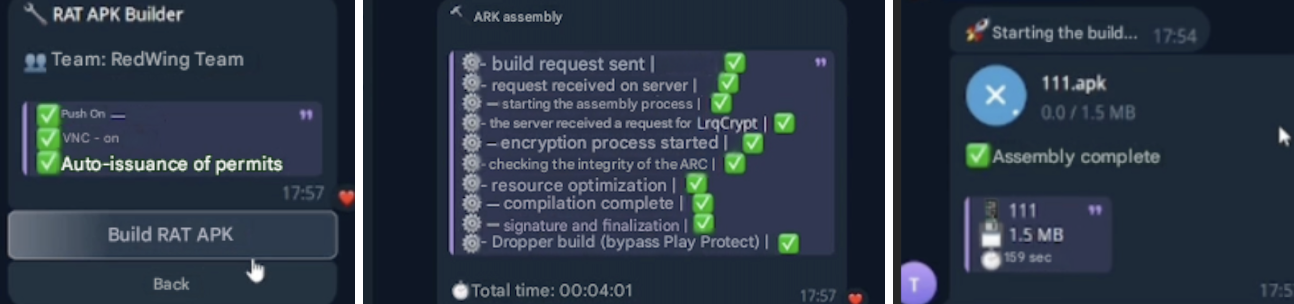
Fig.1: Telegram bot for building the apk
Through RedWing's Telegram channel, we identified their different business models, from subscription tiers (Fig.2) to a referral scheme (Fig.3) designed to incentivize further distribution of the malware via additional discounts.
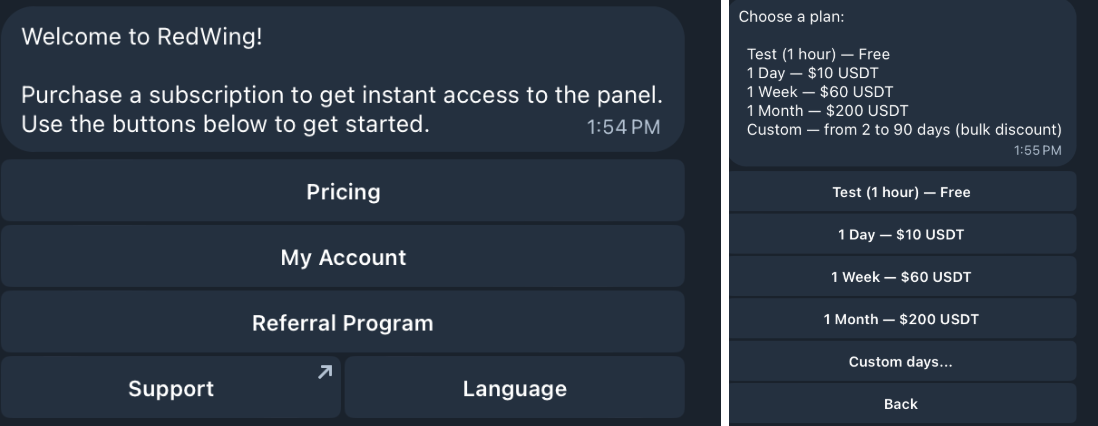
Fig.2: Pricing of RedWing Panel
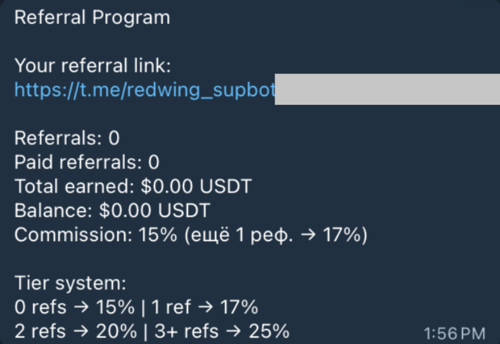
Fig.3: Referral program of RedWing
By deploying fraudulent banking overlays and exploiting SMS permissions to intercept 2FA messages, RedWing poses a severe and direct threat to financial institutions and their customer base, heavily compromising the security of mobile banking operations. Apart from those features, we are going to explain all the options detailed on its channel.
Dropper Constructor
Analysis of the command-and-control (C2) infrastructure reveals a highly customizable 'Dropper Constructor' module utilized to forge the initial infection vector. The panel permits operators to deploy tailored phishing layouts that closely mimic the user interfaces (Fig 4) of prominent app stores, specifically Google Play, the Galaxy Store, and AppGallery or to design fully custom templates. Furthermore, the dashboard provides granular control over the deceptive interface, allowing threat actors to enhance the lure's credibility by seamlessly modifying "application metadata". This includes customizing (Fig 5) user ratings, review volumes, download statistics, developer names, and localized update banners designed to coerce the victim into executing the payload. The resulting appearance of these fraudulent landing pages is illustrated in Fig 6.
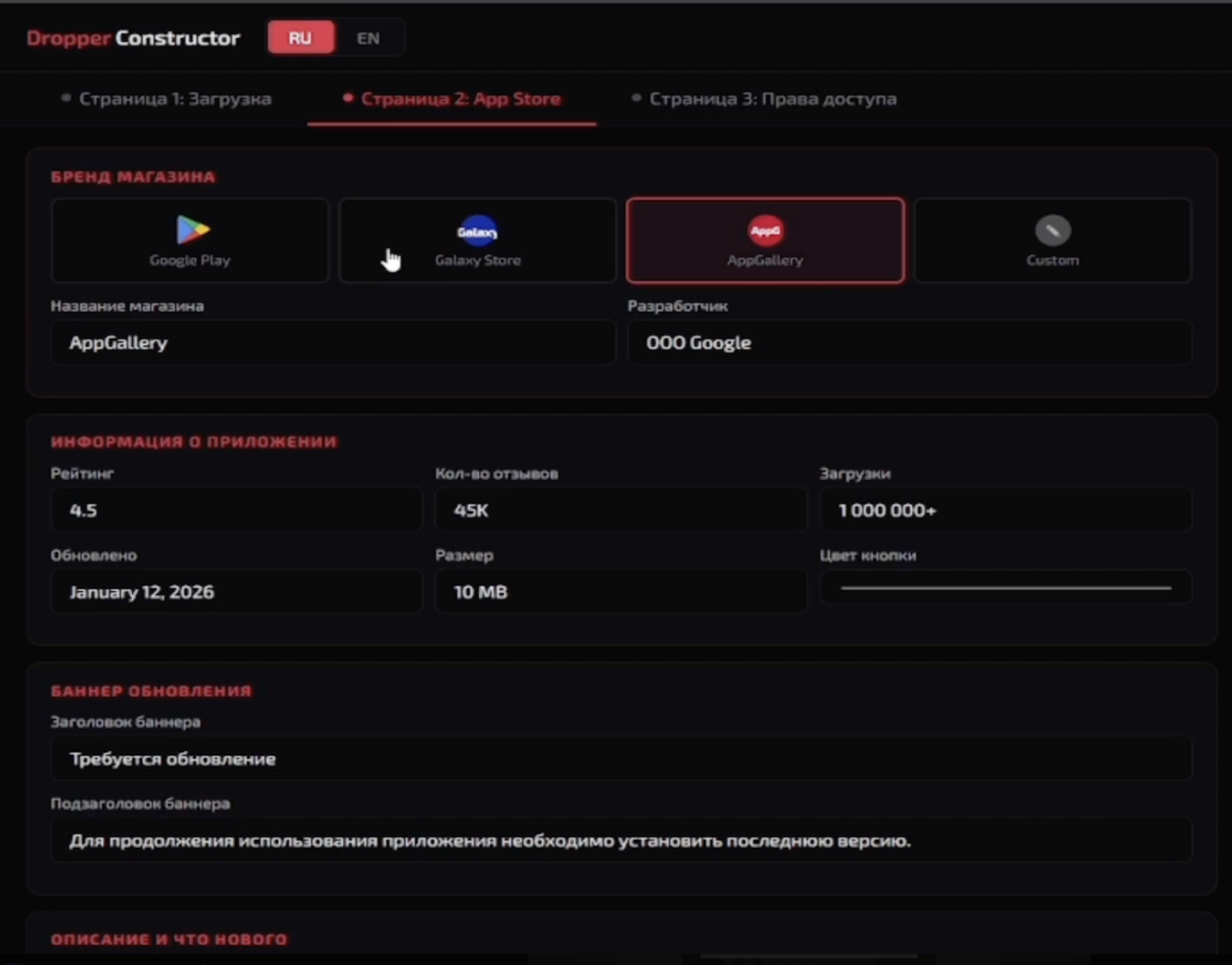
Fig.4: Dropper construction panel
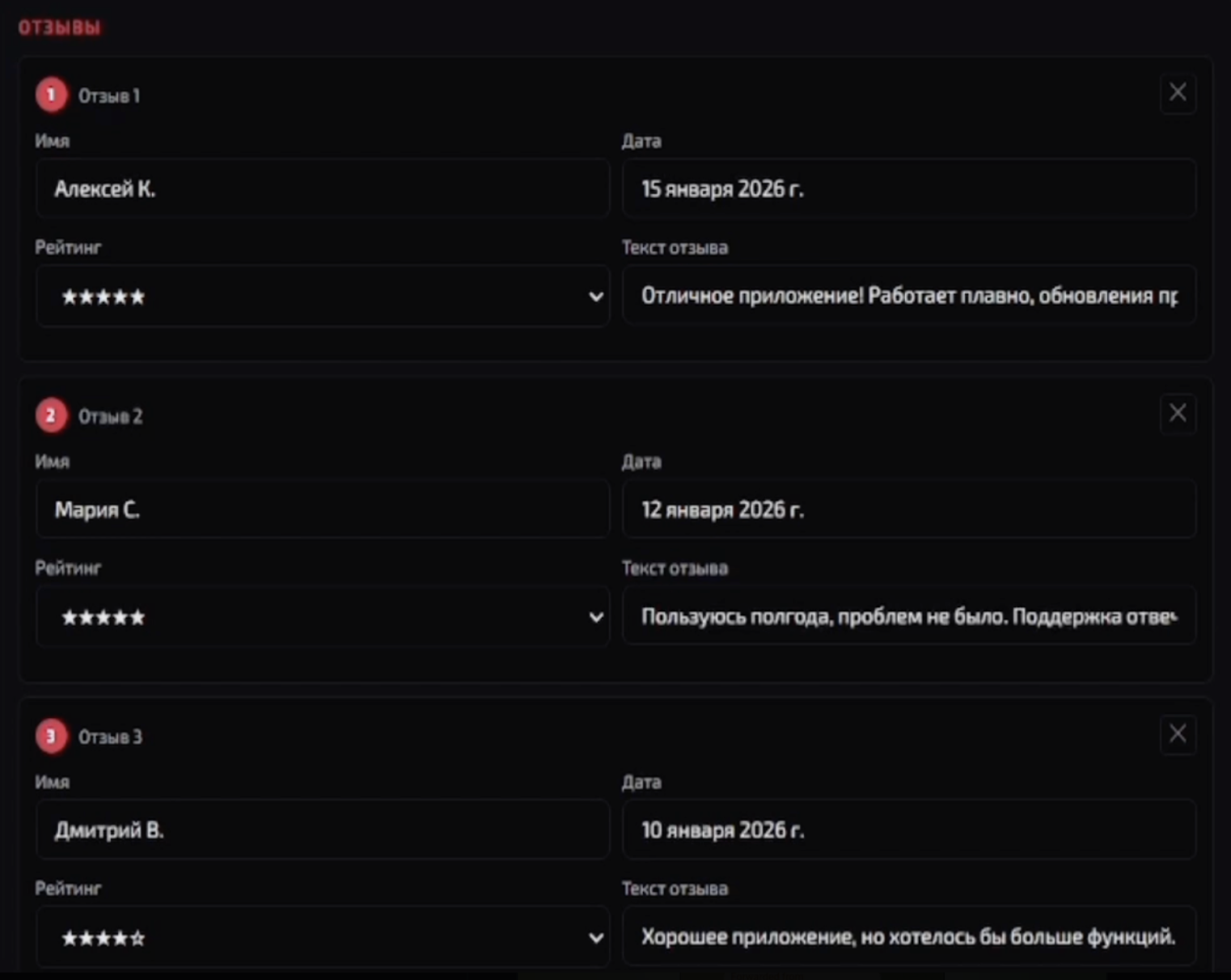
Fig.5: Fake reviews to deceive victims
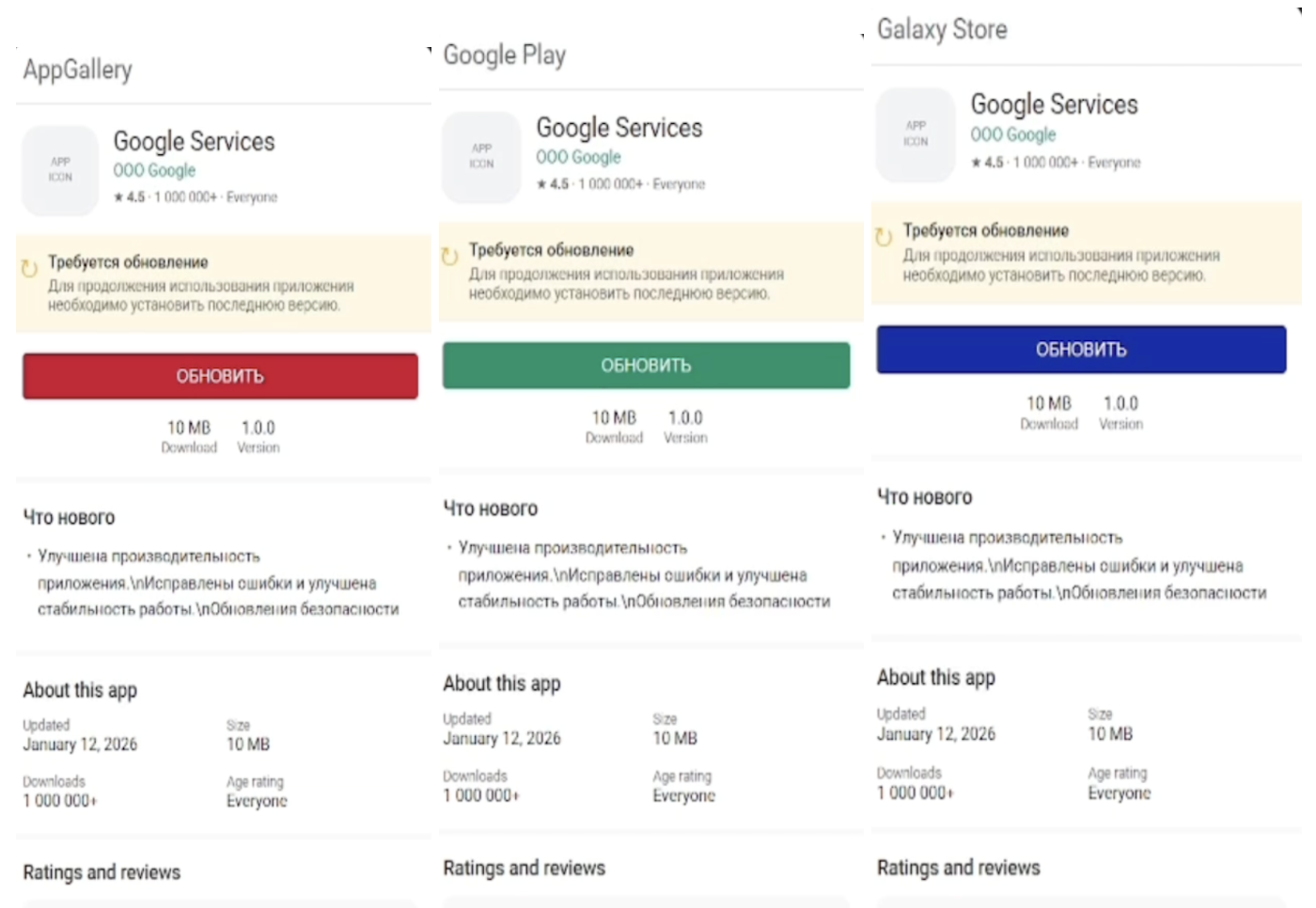
Fig.6: Fake Market places layouts
Malware Customization
Prior to establishing full remote control, the malware must secure an operational foothold on the victim's device. To achieve this, the C2 panel features a sophisticated 'Onboarding Constructor'. Within the 'Stealer' configuration module, operators can deploy a deceptive 'WebView + Cards' interface. This mechanism loads a benign-looking webpage in the background to establish legitimacy, while sequentially overlaying customized permission prompts (cards) from the bottom of the screen (Fig 7). Through tailored social engineering lures, the malware coerces the user into granting critical system access, specifically targeting three core permissions: disabling Battery Optimization (to ensure uninterrupted background execution), setting the application as the Default SMS handler (crucial for intercepting 2FA codes), and access to Notifications.
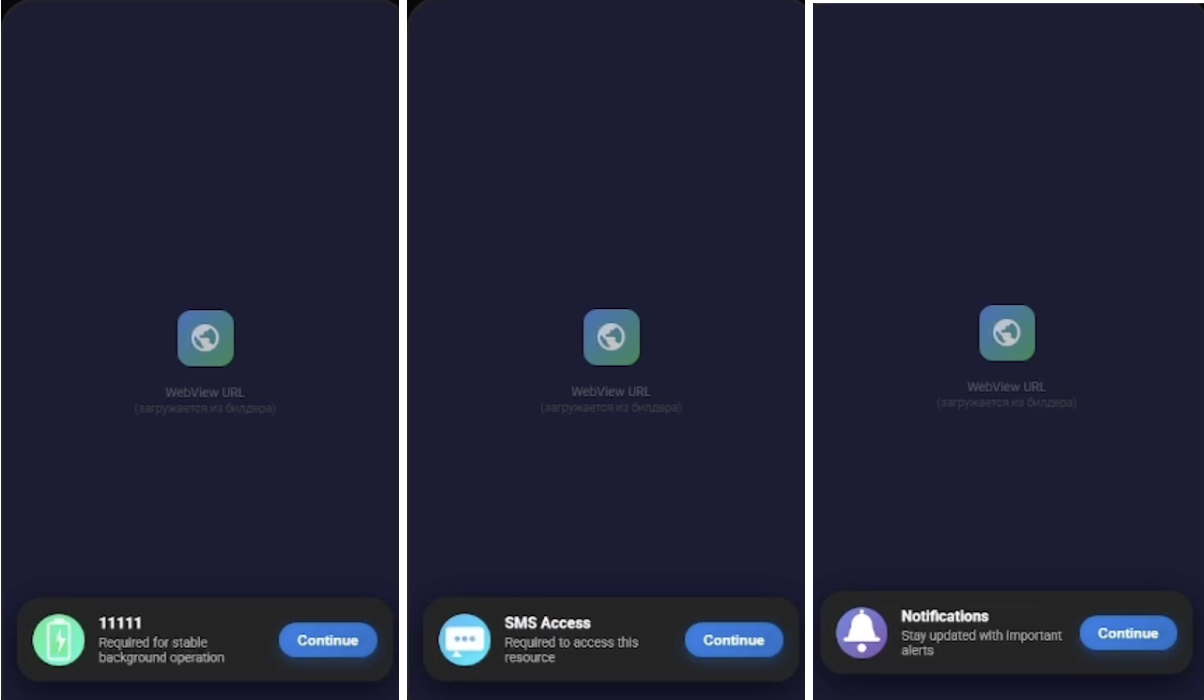
Fig.7: Overlays to triggered permissions
The malware transmits its granted permissions to the Command and Control (C2) server in real time. This telemetry enables the C2 to determine which malicious commands can be successfully executed on the compromised device as shown in the captured payload:
|
{ "location": false, |
In the RAT Admin panel the threat actors can fully customize the malicious payload, such as the accessibility service name, its descriptive text to create highly convincing social engineering lures (Fig 8), ultimately tricking victims into granting the Accessibility permission.
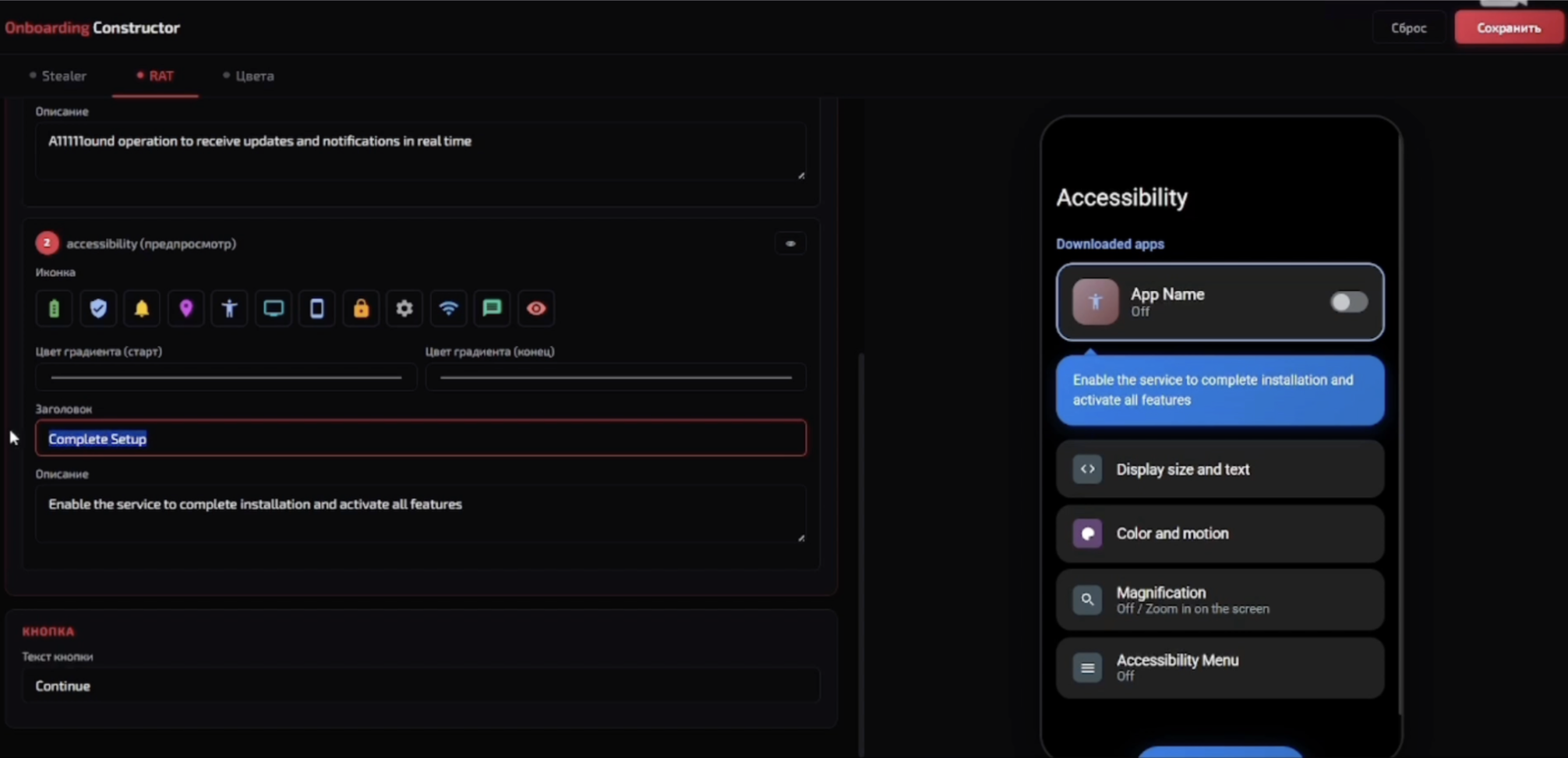
Fig.8: Accessibility permission customization
RedWing Malware Analysis
To validate the malware features offered in its administration panel and its Telegram channels, an analysis was conducted on one of the distributed samples. This artifact clearly demonstrates the practical implementation of the configurations defined within the control panel. The analyzed application serves as the final payload; upon execution, it actively requests the aforementioned onboarding permissions (Fig.9), in addition to the critical Android Accessibility Service. It should be noted that the initial dropper responsible for sideloading this specific payload in this case is simulating the RuStore market.
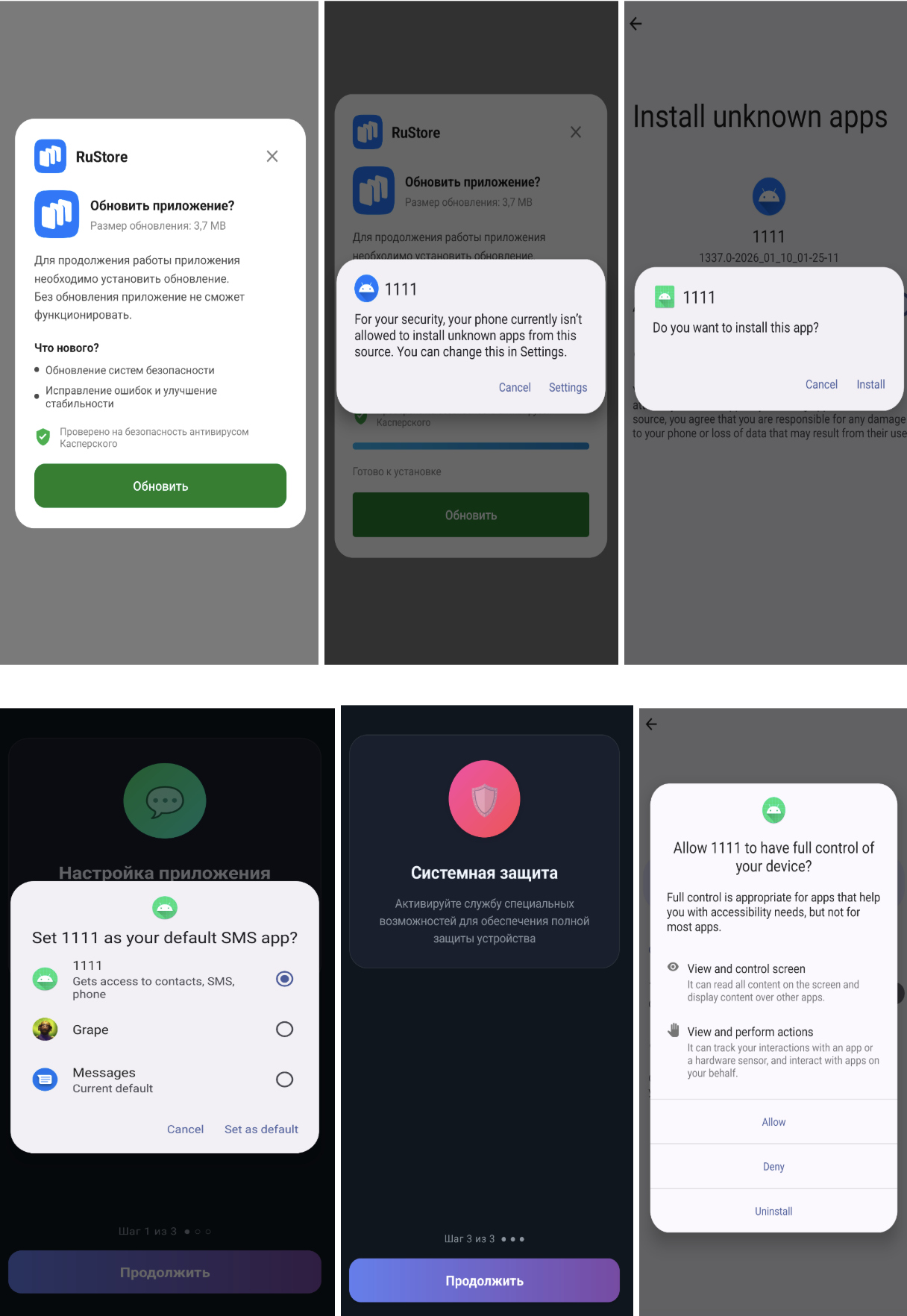
Fig.9: Malware dropper and payload app
Full Screen Manipulation
The malware's Command and Control (C2) server exhibits sophisticated screen manipulation capabilities (Fig. 10), ranging from capturing screenshots to deploying deceptive overlays. These overlays are strategically used to harvest device PINs or project fake loading and update screens designed to restrict user interaction.
To achieve this level of screen control, the malware leverages a variety of internal commands. For example, the <show_overlay> command allows it to inject custom layouts, while commands such as <long_click> and <swipe> are used to seamlessly simulate genuine user interactions. A comprehensive list of these commands can be found at the end of this blog post.
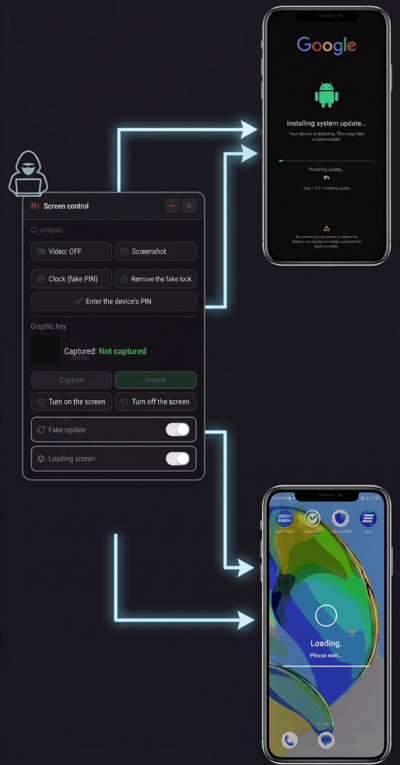
Fig.10: Different overlay’s on top of screen controlled by RedWing
System File Enumeration and Victim Application Management
The spyware gains comprehensive access to all files on the targeted device (Fig. 11). Furthermore, it can remotely execute any application from the victim's list of installed apps.
By utilizing the <open_app> or <open_url> commands, the malware can launch a specific package name or URL received from the server, executing them via Android Intents.
To harvest device data, the malware uses the <get_files> command to enumerate all files within the /sdcard directory. It then bundles the information about these files into a JSON payload and uploads it to the server.
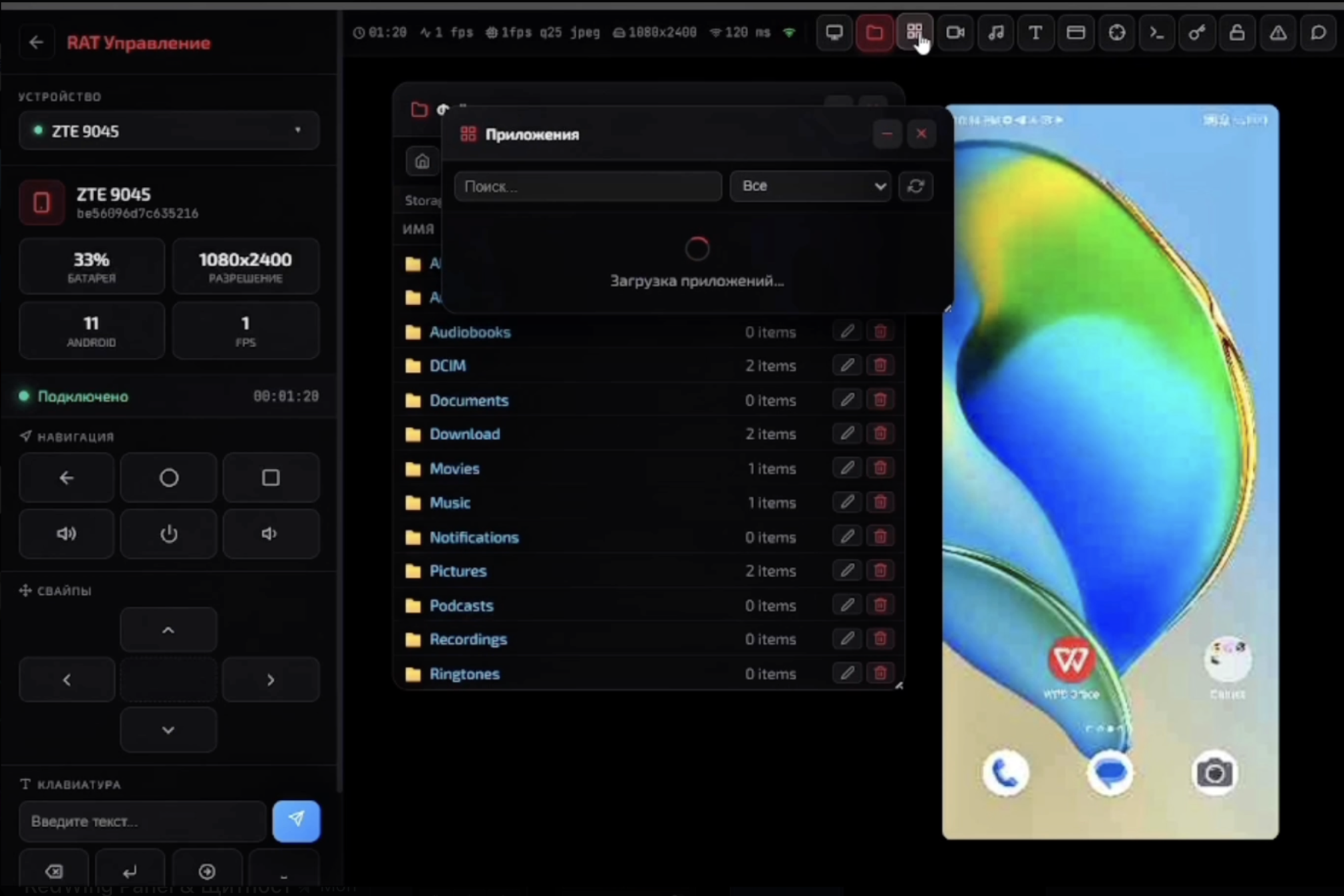
Fig.11: C2 panel providing a comprehensive view of the files residing on the compromised device
Real-Time Surveillance: Audio and Camera Capture
The malware is capable of remotely activating the cameras and the microphone of an infected device (Fig. 12). This functionality is executed via specific commands. For instance, the <take_photo> command allows the attacker to remotely capture images using the device's camera. Similarly, the <start_recording> command leverages the MediaRecorder API to capture ambient audio. This audio recording process is managed entirely from the remote server, which allows the attacker to configure the exact duration of the recording, among other parameters.
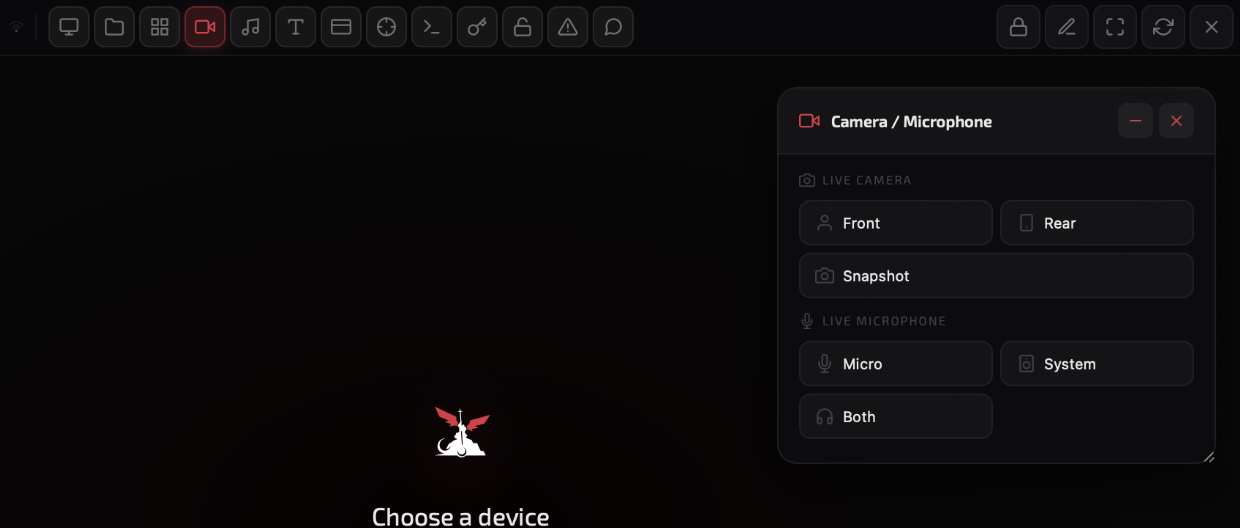
Fig.12: Live capturing of victim’s audio and video
Exfiltration of PII info: SMS, Contacts, Call Logs, and Device Metadata and more
The spyware is designed to exfiltrate a comprehensive range of data from infected devices, specifically targeting SMS messages, contact lists, and call logs (Fig.13). Its capabilities extend beyond mere data theft; it can actively interfere with the victim's communications by forwarding incoming calls, sending unauthorized SMS messages, and triggering push notifications. Additionally, the malware has the functionality to track the victim's precise geographic location.
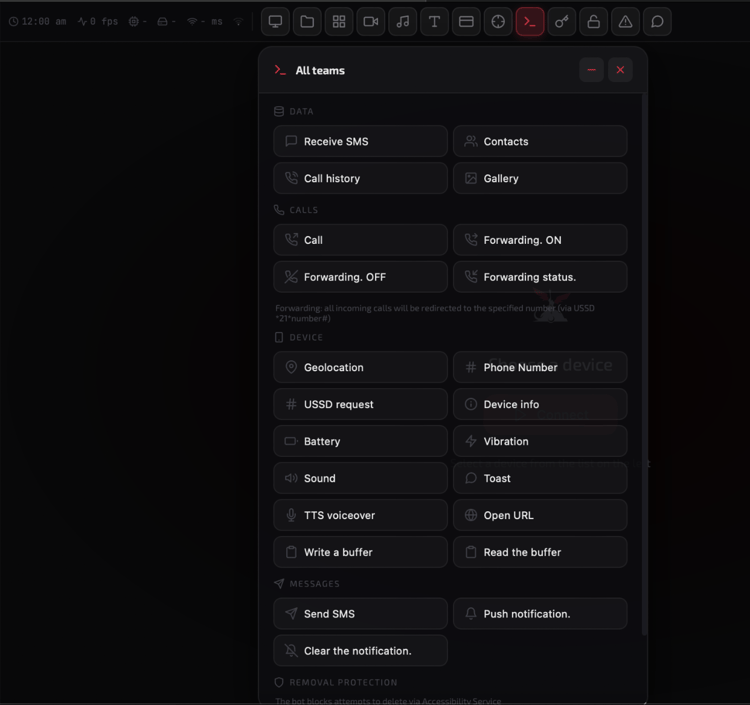
Fig.13: Different capabilities of the malware
In the captured network traffic (Fig. 14), we can observe the malware issuing the <get_phone_number> and <ussd_request> commands. These are utilized to exfiltrate the device's mobile number and query the prepaid account balance.
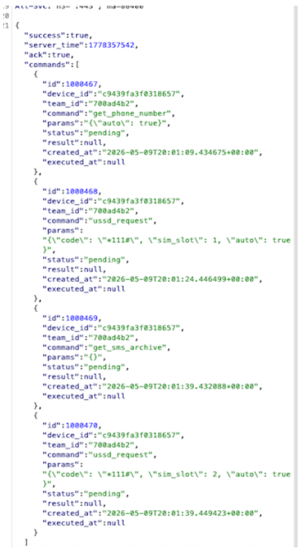
Fig.14: Example of Commands received from the C2
The malware possesses the capability to intercept incoming voice communications by silently establishing unconditional call forwarding. Upon receiving a specific command from the C2 server <call_forward_set>, the malicious app executes hidden USSD requests (using the *21* code) to redirect all of the victim's incoming calls to an attacker-controlled number. This effectively neutralizes voice-based Two-Factor Authentication (2FA) and allows attackers to bypass bank fraud-prevention phone calls.
Overlay Attacks: Harvesting Banking and Crypto Credentials
The malware distinguishes itself through the deployment of both pre-configured and bespoke phishing windows (Fig.15) aimed at financial entities.
From our research, we identified 82 institutions being targeted from different market verticals with a strong focus on Russian financial institutions. However, the list of targeted apps can be modified from the admin panel, allowing attackers to target new apps without distributing new versions of the malware. The categories of targets are shown in Fig 16.
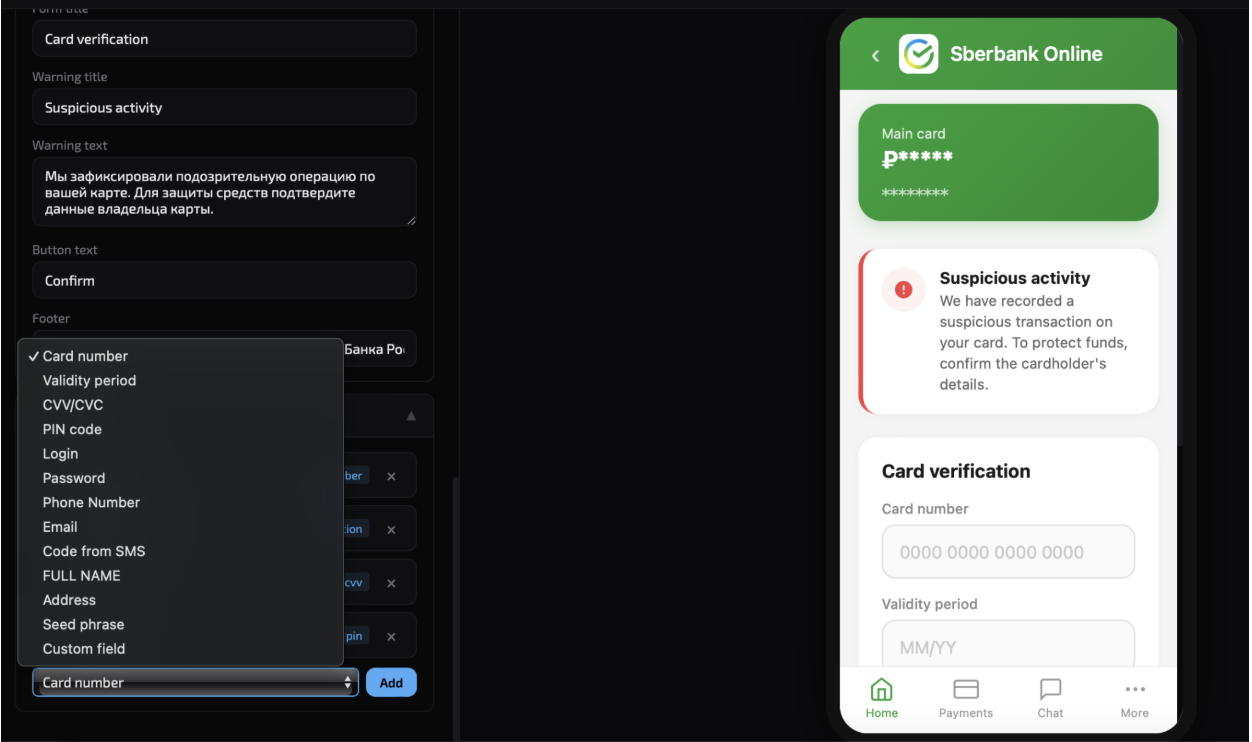
Fig.15: Banking/Crypto phishing windows
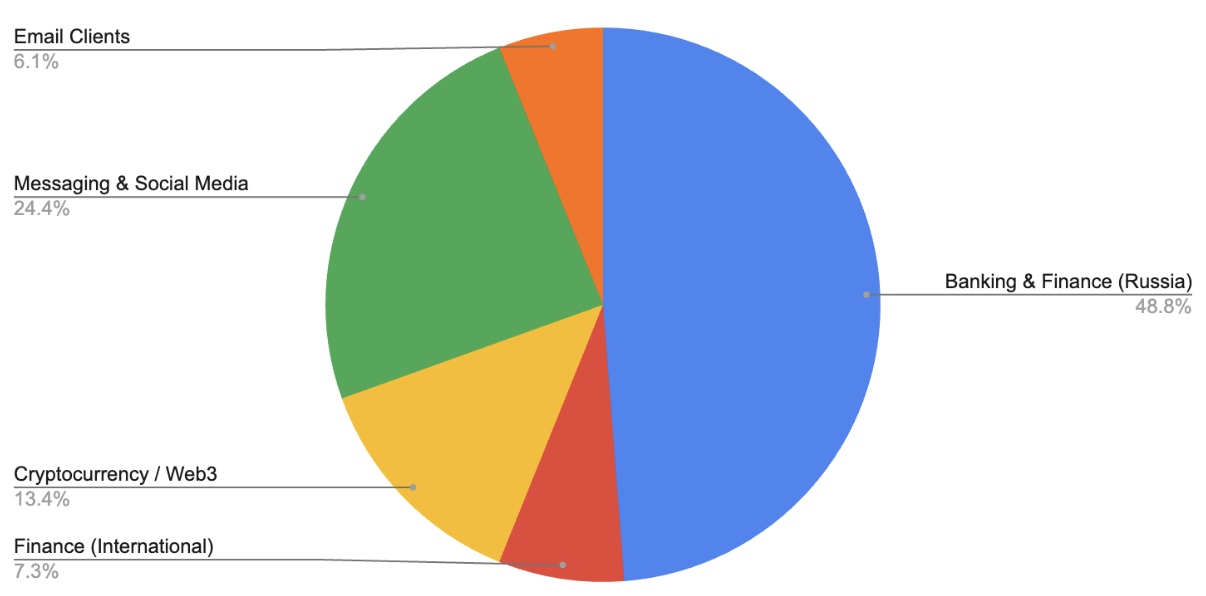
Fig. 16: RedWing target distribution
From our research, we observed that RedWing uses the <request_draw_over> command to obtain the android.settings.action.MANAGE_OVERLAY_PERMISSION. This allows it to display fake overlays whenever a target application is launched.
The malware exploits Android's Accessibility Services in conjunction with Regular Expressions (regex) to continuously monitor for sensitive information. The threat actor employs targeted regex patterns to automatically extract specific data types, including:
- ^\d{4,8}$ : OTPs, PINs, and short authorization codes
- ^\d{13,19}$ : Primary Account Numbers (Credit/Debit Cards)
- ^\d{3,4}$ : CVV/CVC values
- ^\+?\d{10,15}$ : International phone numbers
Despite the sophisticated obfuscation techniques employed, the target list for the Accessibility Service is hardcoded directly within the malware's source code. This architecture strongly suggests that the malicious APKs are dynamically compiled server-side only after the threat actors have defined their specific targets for a campaign.
Live Screen Control via VNC
By leveraging remote desktop-style capabilities, RedWing allows an attacker to monitor and manage a victim's device screen in real time. The malware utilizes the MediaProjection API to record the display, which is then encoded and sent to a specific Command and Control server.
The malware contains several commands (<vnc_XX>) designed to handle the VNC session. For example it deploys a real-time keylogger to capture and exfiltrate all on-screen activity and user interactions and send that information via Websocket to the Server (Fig. 17).
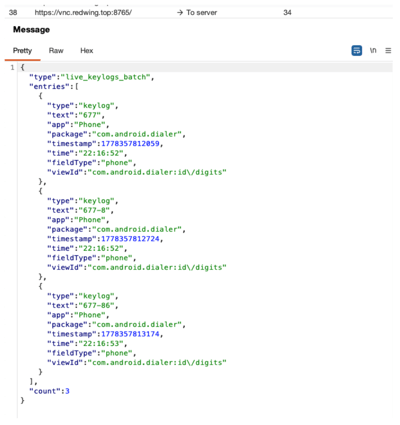
Fig.17: Keylogger sending information of my device
DDoS attack from victim's device
RedWing has the capability to turn infected mobile devices into a coordinated "botnet" to launch Distributed Denial-of-Service (DDoS) attacks directly from the victims' handsets. By flooding a target server or network with a massive surge of traffic, the malware can effectively cripple its operations. As shown in Fig 18, the RedWing control interface allows attackers to execute simultaneous DDoS strikes across all compromised devices against a specific target URL.
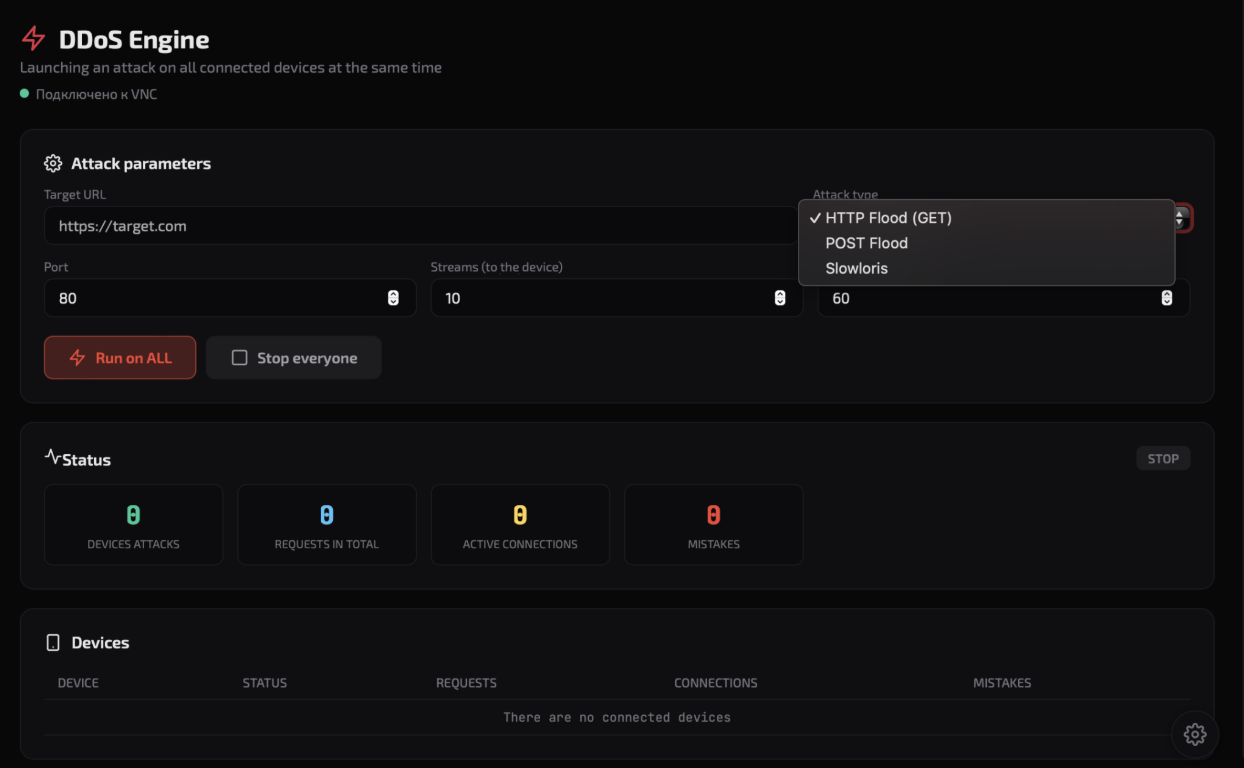
Fig.18: DDoS attack infrastructure from RedWing
MaaS Infrastructure
Through RedWing's Telegram channel, we also observed the malware developer announcing a centralized control panel for managing phishing campaigns across various messaging platforms (Fig.19). This upcoming infrastructure appears designed to streamline the distribution of deceptive content, facilitating large-scale credential harvesting and the centralized management of compromised accounts.
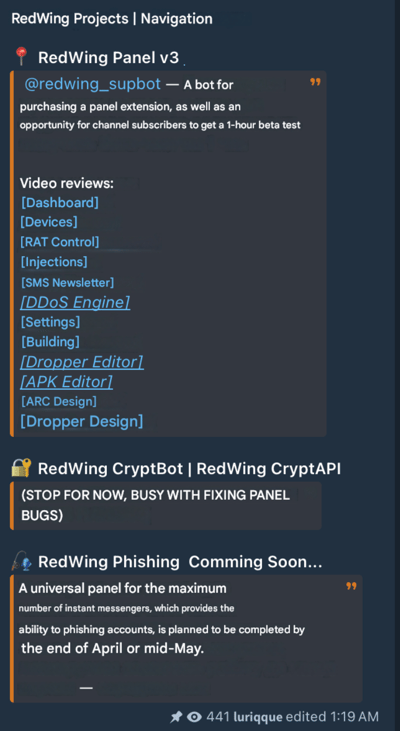
Fig.19: RedWing’s telegram channel new phishing feature announcement
Zimperium vs RedWing
The rapid rise of Malware-as-a-Service (MaaS) operations like RedWing shows how easily attackers can weaponize legitimate Android components to achieve full device compromise. Unlike older banking trojans that rely solely on overlays, RedWing integrates custom droppers, live screen streaming, and abuse of the SMS handler role and Accessibility to exfiltrate data and impersonate legitimate apps in real time. This blend of social engineering and hijacking the incoming calls makes this deep-system control especially dangerous in BYOD and consumer-facing environments where app-store trust is assumed.
Zimperium's Mobile Threat Defense (MTD) and Mobile Runtime Protection (zDefend) provide on-device, behavioral detection that identifies RedWing and similar droppers the moment they are installed on the device without requiring cloud look up. Our dynamic detection engine provides zero-day protection even as threat actors repackage and resell the same core toolkit under new brands.
Moreover, our Web Content Filtering engine can detect malicious traffic and prevent the end user from being lured into the malicious website containing the malware. At the same time, zDefend customers can rely on fraud detection indicators (such as screen sharing active) in order to detect malicious activity happening on the device and effectively prevent credential theft.
As MaaS offerings continue to evolve, enterprises must treat every mobile device as a potential entry point.
Zimperium's mission is to stay ahead of these campaigns, providing continuous, on-device defense against both current and future iterations of Android remote-access and espionage malware.
MITRE ATT&CK Techniques
| Tactic | ID | Name | Description |
|---|---|---|---|
| Initial Access | T1660 | Phishing | Adversaries host external phishing sites to download malicious APKs |
| Persistence | T1624.001 | Event Triggered Execution: Broadcast Receivers | It creates a broadcast receiver to receive SMS events and outgoing calls |
| Defense Evasion | T1655.001 | Masquerading: Match Legitimate Name or Location | Malware payload is impersonating Google Play icon as an extension |
| Defense Evasion | T1516 | Input Injection | Malware can mimic user interaction, perform clicks and various gestures, and input data |
| Defense Evasion | T1406.002 | Obfuscated Files or Information: Software Packing | Loads the encrypted dex dynamically from its assets |
| Credential Access | T1417.001 | Input Capture: Keylogging | It has a keylogger feature |
| Credential Access | T1417.002 | Input Capture: GUI Input Capture | It is able to get the shown UI. |
| Credential Access | T1517 | Access Notifications | Can listen to the notifications |
| Discovery | T1426 | System Information Discovery | It gets device info such as device name, Android version etc |
| Discovery | T1418 | Software Discovery | Malware collects installed application package list |
| Collection | T1517 | Access Notifications | It registers a receiver to monitor incoming SMS messages |
| Collection | T1513 | Screen Capture | Malware can record screen content |
| Collection | T1512 | Capture Camera | Malware opens camera and takes pictures |
| Collection | T1429 | Audio Capture | Malware captures Audio recordings |
| Collection | T1616 | Call Control | Malware can make calls |
| Collection | T1636.002 | Protected User Data: Call Log | Malware steals call logs |
| Collection | T1636.003 | Protected User Data: Contact List | It exports the device's contacts. |
| Collection | T1636.004 | Protected User Data: SMS Messages | Steals SMSs from the infected device |
| Input Capture | T1417.001 | Input Capture: Keylogging | Malware can capture keystrokes |
| Input Capture | T1417.002 | Input Capture: GUI Input Capture | It is able to get the shown UI. |
| Command and Control | T1437.001 | Application Layer Protocol: Web Protocols | Uses HTTP protocol to communicate with C&C servers. |
| Command and Control | T1481.002 | Web Service: Bidirectional Communication | It uses websocket communication to poll the TA's server and get the commands to execute. |
| Exfiltration | T1646 | Exfiltration Over C2 Channel | Sending exfiltrated data over C&C server. |
| Impact | T1582 | SMS Control | It can read SMS messages. |
| Impact | T1616 | Call Control | TAs can make call from victim's device |
IOCs
RedWing IOCs can be found in this Github repository.
Complete List of Commands Used by the Malware
The table below provides a comprehensive list of commands utilized by the malware, detailing their functions and the capabilities they enable on compromised devices.
| Command | Description |
|---|---|
| show_icon | Makes the app icon visible |
| request_default_sms | Requests for default sms activity for the victim |
| refresh_status | Collects device status screen state via PowerManager and battery via BatteryManager |
| update_status | Alias of "refresh_status" that triggers the same routine to collect screen state via PowerManager and battery level via BatteryManager |
| vnc_recents | open recent apps |
| uninstall_app | Uninstalls a specific app where package name received from server |
| get_device_info | Sends device info such as model, manufacturer and checks things like rooted, emulator environment |
| ussd_request | Triggers a USSD request (default *111#) via the device's telephony interface |
| open_app | Opens a specific app where package name received from server |
| open_url | Opening the provided URL and returning a JSON confirming the opened link. |
| clear_notifications | clear all notifications and return a JSON confirming success. |
| screen_off | schedules a task that forces the screen to stay off |
| screenshot | Triggers a screenshot via AccessibilityService and returns success status. |
| vnc_status | Checks whether screen capture is currently active |
| lock_screen | Places lock screen overlay on top of screen |
| get_phone_number | Clears cached phone data and retrieves the stored phone number from SharedPreferences. |
| get_battery | Gets battery percentage and checks if charging and reports back to c2 |
| get_gallery | Gets all the images from the gallery |
| get_sms | Steals all the SMS from the server |
| get_location | Gets the current location of victim |
| ping | Pings the device |
| send_push | Displays a push notification with the given title and message |
| request_location_permission | Manually requests SMS permission to the victim |
| screen_on | stops the forced screen-off behavior and allows the screen to turn on. |
| heartbeat | Alias of "refresh_status" that triggers the same routine to collect screen state via PowerManager and battery level via BatteryManager |
| get_sms_archive | Collects device SMS messages, encodes them in Base64 as an archive, and returns them in a JSON |
| vnc_click | Clicks on specific x and y coordinates |
| vnc_start | initiates a remote VNC session with a specified server URL |
| vnc_swipe | Swipes with X and Y coordinates received from server |
| vibrate | triggers device vibration |
| sync_contacts | Reads all contacts from the device via the Contacts content provider |
| send_sms_silent | Sends SMS to a specific number |
| hide_icon | Hides app icon |
| unlock_screen | Removes lock screen overlay from the victim's screen |
| get_calls | Gets all the calllogs from the victim's device |
| get_files | Gets all the files from the device |
| clear_phone_cache | Clears phone number prefs from the shared preferences |
| send_sms | Sends SMS to a number |
| vnc_home | Triggers a Home button |
| vnc_stop | Terminates the VNC session |
| vnc_type | Appends the given text into the currently focused input field |
| request_admin | Requests for device admin permission |
| get_contacts | Collects all the contacts from the victim |
| play_sound | Plays a specific sound like notification to the victim |
| get_apps | Gets all installed apps in the device |
| clear_keylogs | Deletes all stored keylogs |
| back | Clicks back |
| click | Clicks on specific point on the device |
| gesture_path | gestures path and dispatches it to simulate touch/swipe actions |
| hide_overlay | Hides the pin overlay from the victim |
| home | Forces the device to go to the Home screen |
| key | Takes a remote keyCode and uses the AccessibilityService to simulate that key press on the device |
| lock | Lock the screen using accessibility Service |
| long_click | Simulates long press at a particular point |
| notifications | opens the Android notification panel |
| power | Triggers the Android power menu using AccessibilityService. |
| power_dialog | Same as "power" command |
| recents | opens the Android "recent apps" overview |
| scroll_down | Synthetic swipe gesture to scroll down the screen |
| scroll_up | Synthetic swipe gesture to scroll up the screen |
| set_overlay_pin | Modify the "pin" value checked when we place the pin overlay (by default 1234). This value can be also modified on the show_overlay command |
| show_overlay | Shows pin overlay on top of the screen |
| swipe | simulates a swipe on the screen |
| type | Remotely injects(types) text into the currently focused input field using AccessibilityService |
| wake_screen | Wakes up the device screen and keeps it on for 5 seconds using a WakeLock |
| get_keylogs | Sends the captured keylogs to the server |
| get_recording | Sends the captured audio recording to the server |
| get_skeleton | Collects structured UI/screen layout data and sends it to the server |
| pong | records the current time to know connection is still alive |
| start_skeleton | Stops any existing "skeleton" thread and starts a new continuous background task |
| start_stream | stops any existing stream, prepares resources, and starts a new streaming task |
| stop_recording | Stops the media recording service |
| stop_skeleton | Stops a running background "skeleton" task by disabling its loop and interrupting its thread. |
| stop_stream | Stops the VNC stream |
| volume_up | Increases the media stream volume |
| volume_down | Decreases the media stream volume |
| fake_update_on | Places fake update screen on top the screen |
| fake_update_off | Removes the fake update screen from the screen |
| loading_on | Places loading screen on top of screen |
| loading_off | Removes loading screen on top of the screen |
| black_screen_on | Turns on black screen |
| black_screen_off | Turns off black screen |
| unlock_with_pin | Programatically unlocks the phone with the stolen pin |
| get_pin | returns the stored PIN (if present) to the c2 |
| set_pin | stores a received PIN in memory and SharedPreferences, then sends a JSON response back |
| stop_live_keylogs | Stops the live keylogging from the victim device |
| inject_sync | Make a POST a C2+/api/data/inject/templates |
| inject_enable | Enables the overlay injection |
| inject_disable | Disables the injection |
| inject_reset_captures | Resets all the injections |
| permissions_auto_grant | Auto grants permissions programmatically from victim's device |
| permissions_status | collects and reports the status of various device permissions (such as location, SMS, and contacts) back to the controller or requesting endpoint. |
| permissions_stop | Disables a feature flag that overrides granted permissions, resulting in behavior equivalent to the application lacking the necessary permissions. |
| open_notification_listener | Launches the Android system Notification Listener Settings screen |
| open_overlay | opens the Android system "Display over other apps" (overlay permission) settings screen for the app, prompting the user to grant overlay permission |
| open_default_sms | Opens default sms permission dialogue on top of the screen |
| open_device_admin | Opens device admin permission screen on the device |
| open_battery | Opens various Android battery optimization and power management settings (including device-specific pages) to request the user to exempt the app from battery restrictions for uninterrupted background execution. |
| open_accessibility | Opens accessibility settings |
| open_usage_stats | Opens the Android Usage Access (Usage Stats) settings screen to request permission for monitoring app |
| enable_protection | Sets an internal flag to enable protection mode in the app |
| disable_protection | Disables protection temporarily by applying a timed delay |
| self_uninstall | Disables the disable_protection flag and launches the Android uninstall intent to self remove the application from the device |
| restart_stream | Restarts vnc stream |
| pin_capture_toggle | switch that turns PIN capture monitoring ON/OFF for specific apps, stored dynamically in memory. |
| pin_capture_scan | builds a live list of important installed apps (especially banks/crypto) and marks which ones should be actively tracked. |
| pin_capture_get | Reports current PIN capture target app configuration to the controller |
| get_dbg_log | Retrieves the app's internal debug log file and returns it remotely in JSON format |
| keep_screen_on | Keep device awake |
| start_stream | Starts live screen capture / streaming of the device. |
| update_stream | Dynamically changes quality and resets internal streaming state without stopping the stream |
| stop_stream | Stops the stream |
| start_device_metrics | Sends device metrics such as cpu usage, RAM usage etc |
| stop_device_metrics | Stops device metrics analysis |
| start_live_keylogs | Starts keylogging with package name, text etc |
| get_pattern | returns the stored pattern(if present) to the c2 |
| capture_pattern | Displays a pattern lock capture overlay |
| set_pattern | stores a received Android unlock pattern in memory and SharedPreferences |
| unlock_with_pattern | Programatically unlocks the phone with the stolen pattern |
| get_password | returns the stored password (if present) to the c2 |
| capture_password | Displays a password lock capture overlay |
| unlock_with_password | Programatically unlocks the phone with the stolen password |
| inject_list | Sends a JSON response containing the malware's targeted app list, including package names, app names, and whether credentials/data have already been captured for each app. |
| inject_push_template | Receives attacker-controlled HTML from the C2, saves it and maps it to the targeted app package, and is likely used later to display WebView based phishing overlays or fake push/login screens for credential theft. |
| inject_remove_template | Deletes the phishing/injection template associated with a target app |
| proxy_start | Starts proxy tunnel |
| proxy_stop | Stops proxy tunnel |
| proxy_connect | Establish a network proxy/tunnel session using the supplied session_id, remote host, and port |
| proxy_data | Forwards raw data associated with an active session_id into an already established proxy/tunnel session |
| proxy_disconnect | Terminates an active proxy/tunnel session by session ID |
| get_sim_list | Gets the list of sim's in victim device |
| call_phone | Calls to a specific number from the infected device |
| force_dial | Simulate user interaction in the dialer UI, searching the active screen for callrelated buttons |
| call_forward_set | Enables call forwarding on the victim's SIM by generating a USSD request *21*<number># |
| call_forward_cancel | Triggers a USSD request ##21# to disable all unconditional call forwarding on the victim's SIM, |
| call_forward_status | Queries the current call forwarding configuration on the device |
| take_photo | Takes the photo of the victim using front camera |
| get_photo | Retrieve a captured camera photo from internal storage/cache and exfiltrate it to the C2 server: |
| start_recording | Records audio on the infected device, by default 30 seconds if not provided |
| stop_recording | Stops audio recording |
| get_recording | Sends captured microphone recordings to C2 |
| audio_load | Downloads and prepare a remote audio file for playback on the infected device |
| audio_play | Audio playback on the infected device using a downloaded URL based audio file |
| audio_pause | Pauses the audio |
| audio_resume | Resumes the playback audio |
| audio_stop | Stops any active MediaPlayer playback |
| audio_seek | Allows the C2 to jump to a specific timestamp within the currently playing audio stream. |
| audio_volume | Adjusts the MediaPlayer playback volume by reading a volume value from the C2 |
| start_camera_stream | Initiates a remote camera streaming session, selecting front or rear camera |
| stop_camera_stream | Stops camera stream session |
| start_mic_stream | Starts stream session with mic |
| stop_mic_stream | Stops mic stream session |
| chat_message | Delivers a remote text message from the C2 to the victim |
| open_chat | Launches the malware built in chat UI on victim's device |
| show_alert | Triggers a UI popup on victim's device with custom dialog using attacker provided fields |
| hide_alert | Removes the alert dialogue |
| touch_block_on | Enables a full-screen touch interception / anti interaction mode |
| touch_block_off | Disables interception / anti interaction mode |
| inject_js | Enables remote JavaScript execution inside a WebView context controlled by the malware |
| redirect | Dynamically redirects infected device's remote control (VNC like) connection to a new attacker controlled server and forces a reconnection. |
| ddos_start | Launches a remote multi threaded HTTP flood DDoS attack from the infected device using attacker-defined target, port, threads, duration, and attack type |
| ddos_stop | Stops any DDoS attack running on the device |
| ddos_status | Sends the current state of the DDoS module back to the C2 server |