Executive Summary
The zLabs team recently identified an updated variant of ToxicPanda, the Android banking Trojan known to have primarily targeted Europe, that introduces significant enhancements, including a comprehensive command set of 167 remote commands and substantially expands its targets globally. Among the newly added capabilities is a PIN theft mechanism targeting more than 140 banking and cryptocurrency applications. By abusing the Android Accessibility Service, threat actors can steal every UI element on the screen, alongside an overlay-based credential theft mechanism targeting 349 financial institutions, compared to the previous version, which targeted only 16 banking applications, the latest iteration demonstrates a significant expansion in targeting scope and capabilities. Several commands previously identified as unimplemented in Cleafy’s analysis are now fully operational, expanding the malware’s remote control and fraud capabilities.
The malware also introduces an automated click-based mechanism to abuse Android Wireless Debugging (ADB), enabling privilege escalation and shell-level access on compromised devices. Additionally, it can steal lock screen credentials by placing overlays on top of the lock screen. The updated campaign also reveals a shift in distribution methods, with ToxicPanda 2.0 samples being delivered through Amazon AWS-hosted buckets, indicating the attackers are leveraging cloud infrastructure for malware delivery.
Technical Analysis
ToxicPanda 2.0 continues to abuse Android Accessibility Services to enable remote control capabilities and automate fraudulent activities, similar to its previous variants. However, this updated version introduces several new commands focused on data theft and expanded malicious functionality. Operating as a dropper, the malware first requests VPN service privileges to block network communication from Google Play and Google Play Services on the victim’s device. To achieve this, it presents a fake installation interface (Figure 1) through a WebView and prompts the victim to grant VPN permissions. Once this environment is prepared, the malware decrypts and extracts the actual payload stored within the application’s assets folder and proceeds with its installation (Figure 2).
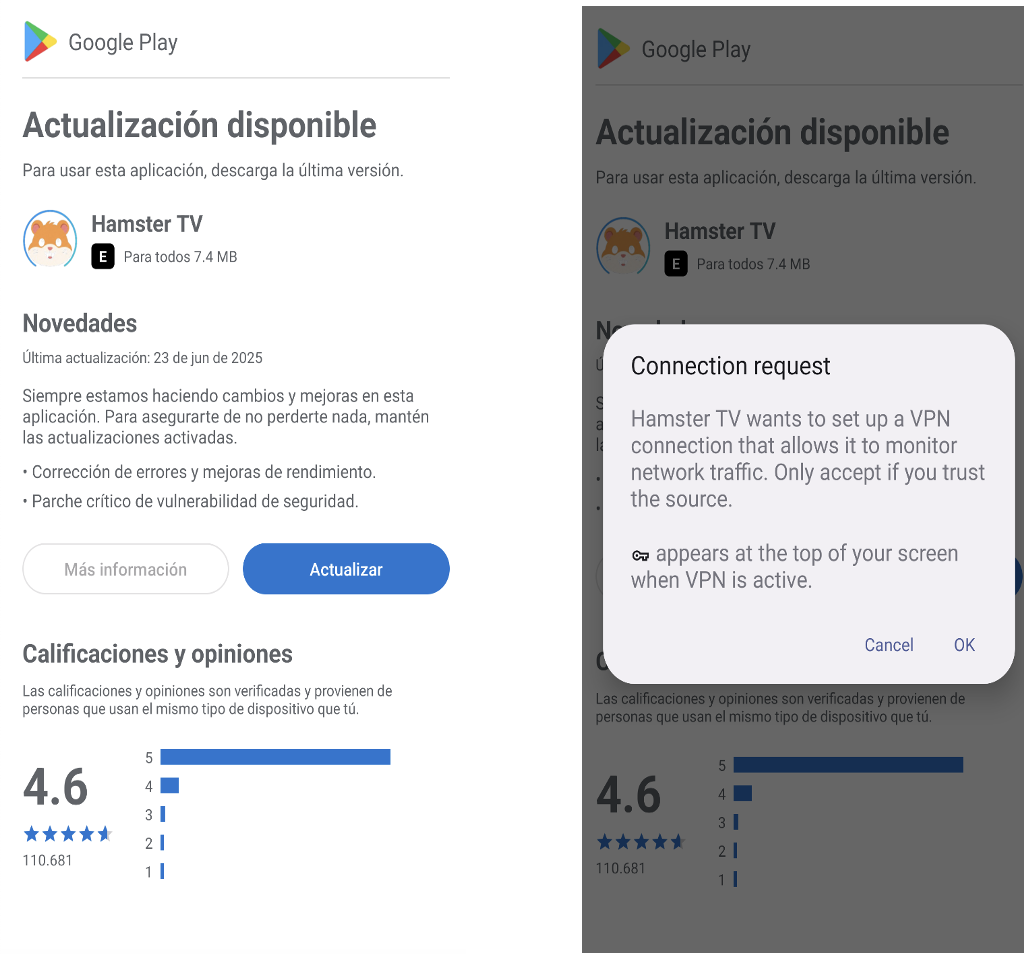
Fig.1: Dropper requesting VPN permission to the victim before payload installation
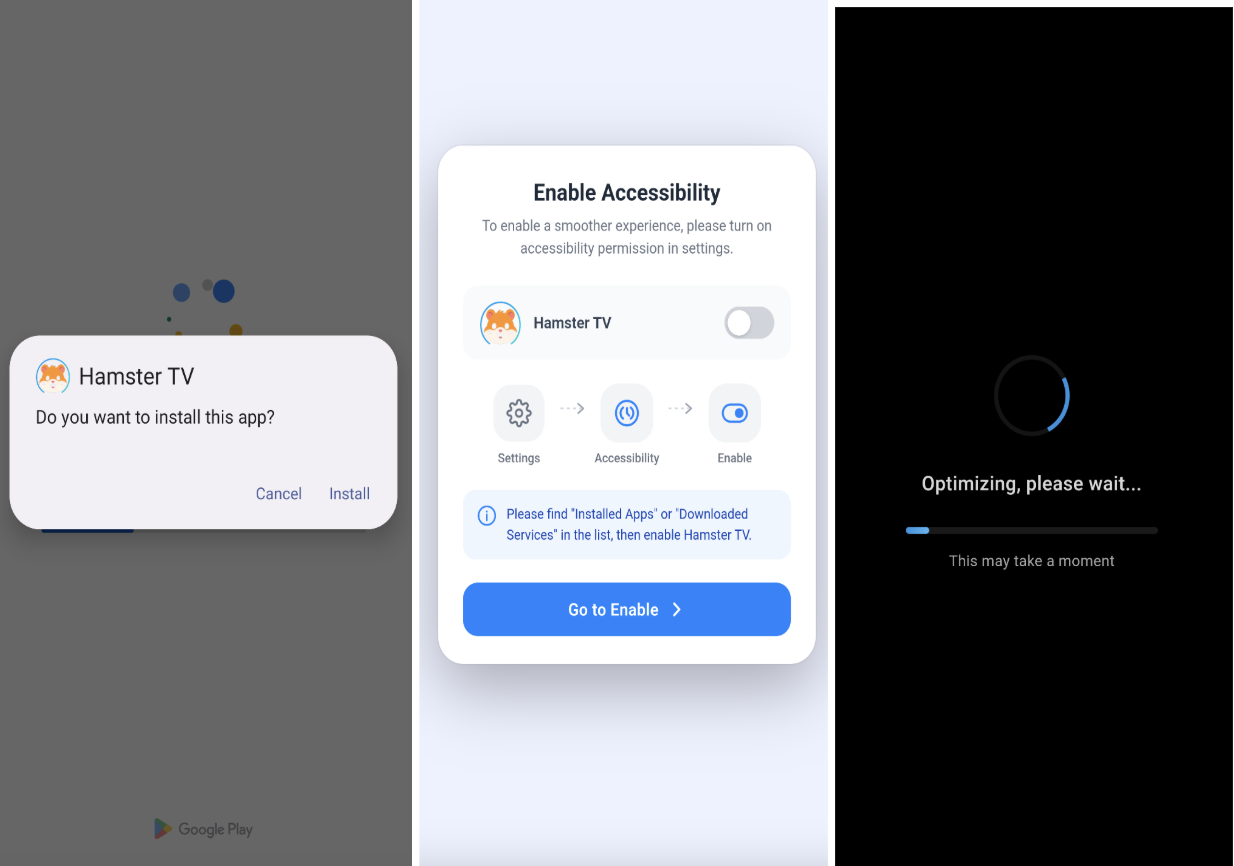
Fig.2: Malware installs the payload and requests Accessibility Service permissions.
Command and Control Server
The interface of the command-and-control (C2) panel has been updated by the malware developers to feature a "v2" title (Figure 3), suggesting a newer iteration of ToxicPanda.
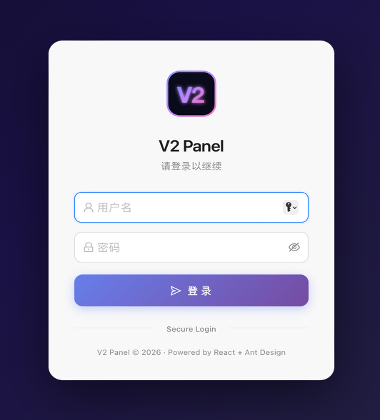
Fig.3: ToxicPanda 2.0 control panel
Just like the previous version, ToxicPanda 2.0 establishes communication with its C2 infrastructure by sending an initial HTTPS request to the remote server to establish a persistent WebSocket connection. This WebSocket channel enables low-latency, bidirectional communication, allowing the malware to receive commands and exchange data with the C2 server in real time. Similar to previous versions, ToxicPanda 2.0 secures C2 communication using AES encryption in ECB mode. The encryption key is embedded inside the source code and derived from a static byte array and converted into a string representation before use.
An example of the HTTPS handshake and subsequent WebSocket-based communication flow is shown in Figure 4.
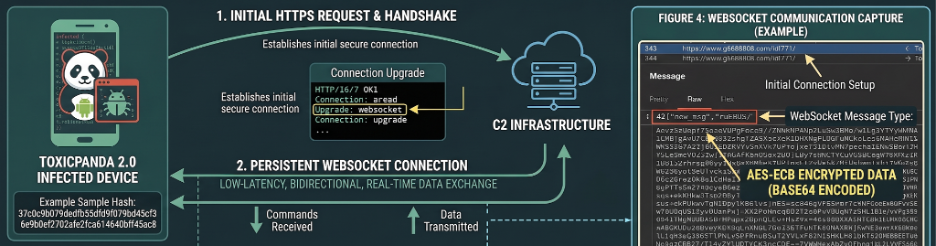
Fig.4: Malware communicating through WebSocket to command and control server
Expansion of Targeted Injections
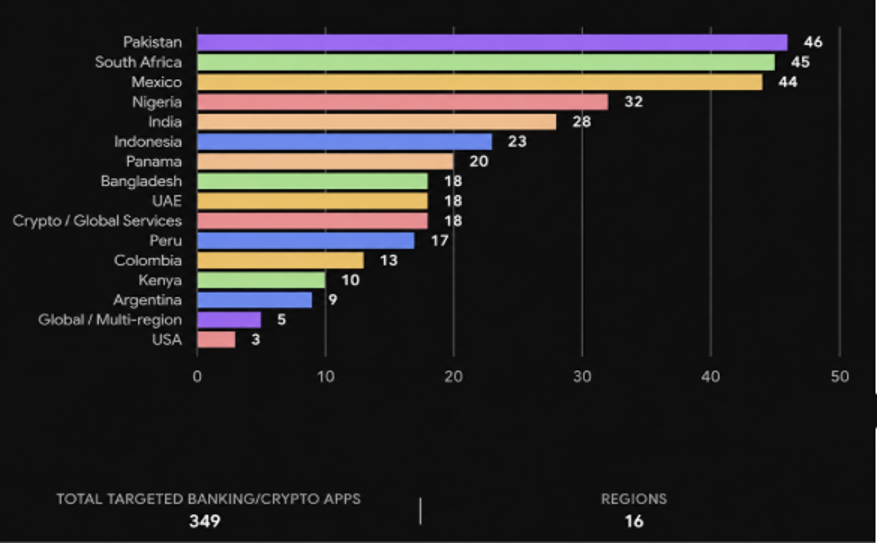
Upon installation, the malware enumerates all applications installed on the victim's device and transmits their package names and icons to the command-and-control (C2) server, allowing the operator to identify installed banking and financial applications. ToxicPanda 2.0 significantly expands its targeting scope, supporting phishing overlays for 349 banking, financial, e-wallet, and cryptocurrency applications across 16 countries. When the victim launches one of these targeted applications, the malware requests a corresponding malicious HTML overlay from the C2 server. Some examples are shown in Figure 5.
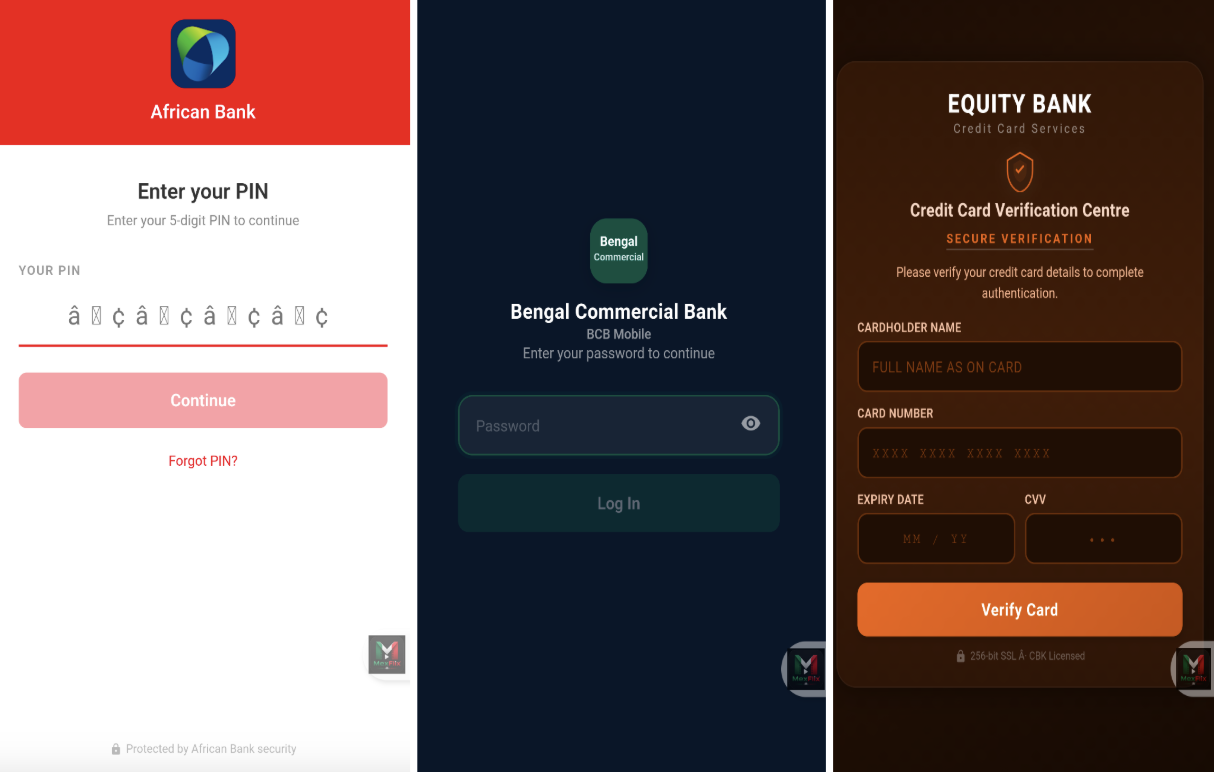
Fig.5: Malware overlays on top of the victim’s screen
These overlays closely replicate the appearance of the genuine application's login or transaction screens, tricking victims into entering credentials, PINs, and other sensitive information that are subsequently exfiltrated to the attacker. Figure 6 summarizes the location of targeted financial institutions across the 16 targeted countries.
Automating Wireless Debugging Pair
The Wireless Debugging framework is an Android feature (introduced in Android 11) that allows developers to run Android Debug Bridge (ADB) commands and debug applications over Wi-Fi without requiring a physical USB connection. The malware abused the Accessibility Service enabling wireless debugging to get <shell> user capabilities to run some commands on the device.
Phase 1: Enabling Developer Options
The malware initially determines whether Developer Options are already enabled on the device. If inactive, it launches the system’s "About Phone / Device Info" settings page and queries the accessibility node hierarchy to locate the "Build number" view. Upon finding the element, it simulates seven rapid tap events in quick succession to unlock developer mode.
Phase 2: Navigating to Wireless Debugging & Toggling the Switch
Once Developer Options are enabled, the malware issues an intent to launch the APPLICATION_DEVELOPMENT_SETTINGS view. It then queries the accessibility layout hierarchy to locate the "Wireless debugging" entry and toggles the switch to the ON state.
Phase 3: Triggering & Scraping the SPAKE2 Pairing Code
To initiate TLS-based pairing, the malware identifies and interacts with the "Pair device with pairing code" option. Once triggered, it continuously polls the layout hierarchy of the newly spawned modal dialog to extract the generated 6-digit PIN (Figure 7) and the dynamic connection port.
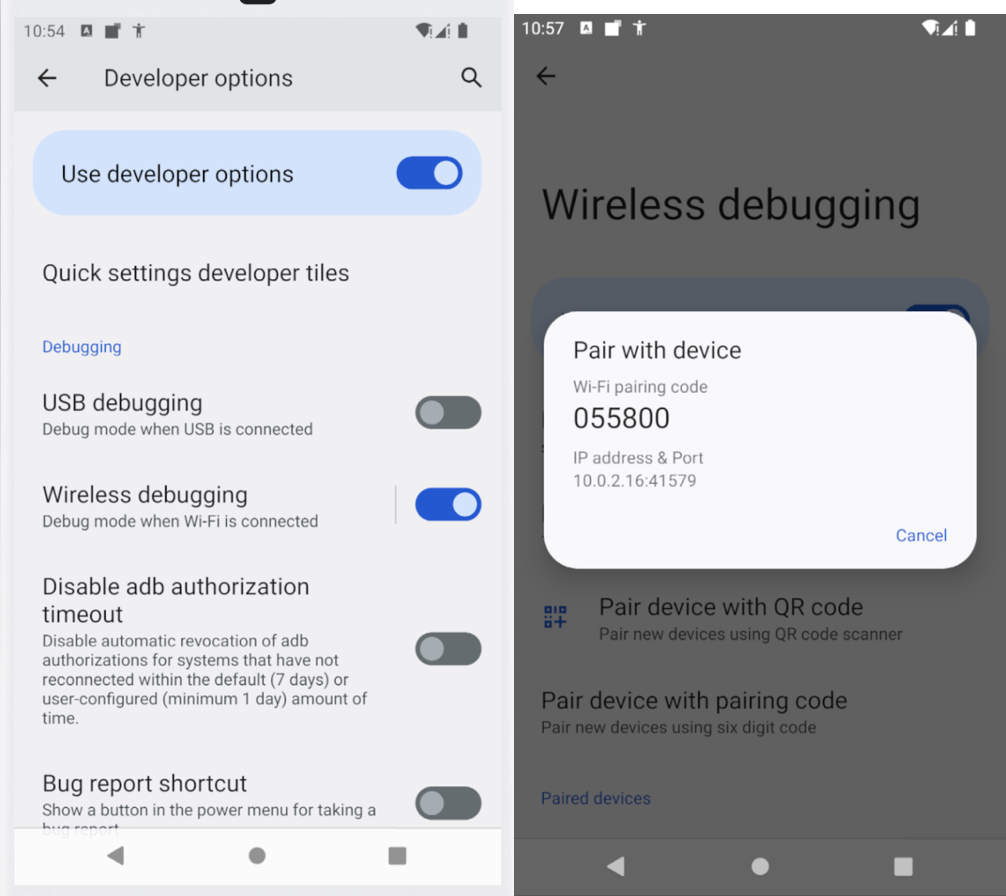
Fig.7: Enable Wireless debugging and get pairing code
Phase 4: Cryptographic Authenticated Pairing
Armed with the extracted pairing code and dynamic port, the application instantiates a local SPAKE2 pairing handler to authenticate its generated keypair with the local ADB daemon listening on 127.0.0.1. It then establishes a TLS-encrypted channel, executes the SPAKE2 key exchange using the extracted 6-digit PIN, and securely trades peer identity metadata to finalize the pairing process.
Phase 5: Shell-Level Post-Pairing Privilege Escalation
Once the malware gains shell user permissions, it starts executing high-privilege commands directly through the ADB daemon, the malware bypasses standard Android runtime consent prompts to grant itself broad permissions, neutralize OS background restrictions, silently enable critical components, and enforce persistence.
Stealing device lock credentials via overlays
Analysis of recent variants highlights a newly incorporated capability designed to harvest device unlock credentials, specifically PINs, patterns, and passwords (Figure 8). By capturing these authentication factors, threat actors can bypass screen lock barriers and maintain persistent, uninhibited access to compromised endpoints. To exfiltrate these credentials, the malware executes a screen overlay attack, deploying a spoofed interface that seamlessly mimics the native Android lock screen.
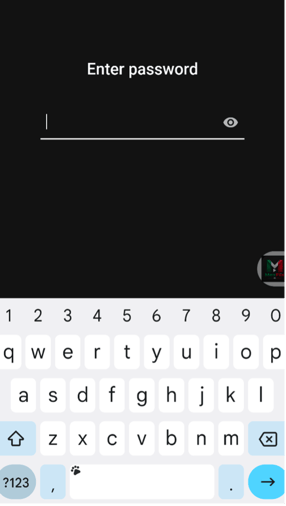
Fig.8: Malware overlay used to steal password of the victim
Fake System Updates
In some of the samples collected, the malware conceals its background actions by displaying deceptive "system update" full screen lock activity over the screen (Figure 9). These templates are rendered using local HTML templates loaded directly from the application's assets/ directory or built from resources/, effectively obscuring ongoing malicious activity from the victim's view.
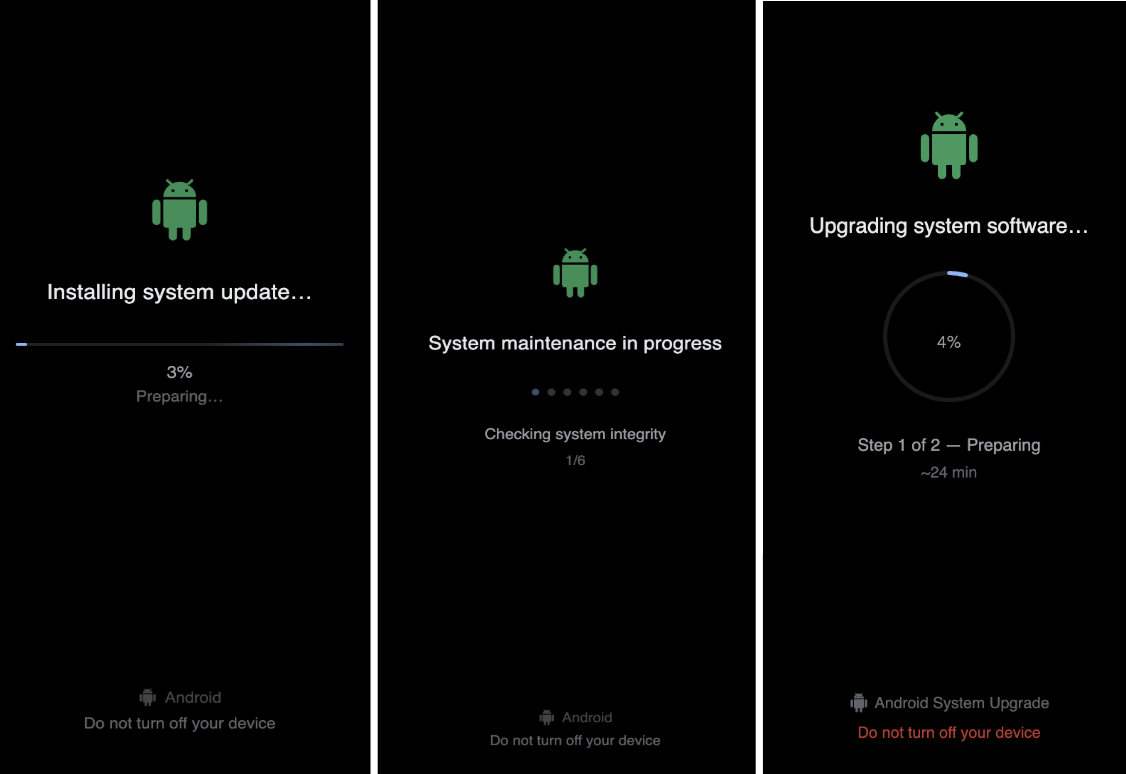
Fig.9: Fake update layouts by the malware
Monitoring Financial Applications
The malware targets financial, banking, e-wallet, and cryptocurrency applications through a multi-step PIN harvesting workflow involving application detection, touch capture, and data exfiltration. It monitors the application currently running on the device through Accessibility Services and checks whether it matches its configured list of targeted applications. When a targeted application is opened, the malware starts its PIN harvesting process.
As the victim uses the targeted banking or payment application, the malware deploys an invisible transparent overlay to capture touch that the victims entered.
The malware also supports dynamic target updates through the <replacePinTargets> command. Upon receiving configuration data from the C2 server, it can replace the existing package and keyword lists with attacker controlled values, allowing operators to update the applications targeted for PIN harvesting.
Implementation of commands from previous versions
In the version disclosed by Cleafy some of the functionalities were still in development and not available. In this new version, instead, some commands are now implemented and working.
Android OEM Permission Automation Config
The command <catAllViewSwitch> (Figure 10), enables the malware to programmatically identify and auto-navigate system permission dialogs, battery optimization prompts, and vendor-specific auto-start configuration screens across a broad range of Android Original Equipment Manufacturer (OEM) ecosystems.
By parsing OEM-customized layout trees and matching localized button text strings, the threat automatically interacts with target UI controls (such as "Allow", "Don't Optimize", or their multilingual equivalents). This automated interaction allows the malware to secure arbitrary runtime permissions and enforce background persistence without requiring explicit user intervention.
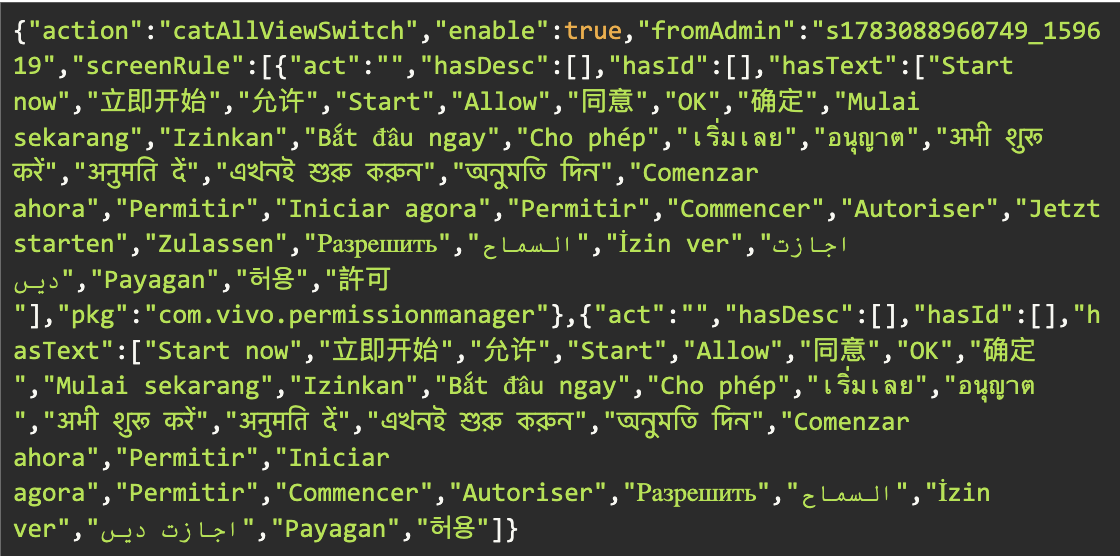
Fig.10: Receiving catAllViewSwitch command from c2
Device Administrator Exploitation Commands
<admSet>:
Issues an explicit system Intent (android.app.action.ADD_DEVICE_ADMIN) to prompt the victim to grant Device Administrator privileges. To entice compliance, the malware presents a social engineering lure with the custom prompt: "System service requires administrator privileges"
<admPwd>:
Leverages DevicePolicyManager.resetPassword() to programmatically force-reset or overwrite the device's local lock screen PIN/password with an attacker-defined string, effectively enabling screen lockout or unauthorized physical device hijacking.
Transparent Overlay Interface
<transparent>:
The malware remotely loads an attacker-controlled URL inside a full screen WebView activity, enabling the display of malicious web content for phishing or deception purposes. This transparent command was not implemented by the previous versions of the malware.
OEM Auto-Start Bypass Logic
To maintain operational persistence across Android’s fragmented OEM ecosystem, the malware leverages the <autoBoot> command to bypass aggressive vendor-specific power management features. Major Android manufacturers such as Xiaomi, OPPO, Vivo, Samsung, and Huawei enforce proprietary battery optimization policies and auto-start restrictions that frequently kill background processes to conserve battery, directly threatening the malware's longevity.
Because the core Android framework lacks a unified public API to manage these proprietary power controls, the malware queries Build.MANUFACTURER to dynamically profile the host device. Upon identifying the OEM build, it dispatches targeted, vendor-specific Intents to open internal configuration activities such as Xiaomi's MIUI Security Center or Samsung's Smart Manager. Once launched, the threat uses its Accessibility Service to whitelist the application, securing uninterrupted background execution and preventing process termination.
Zimperium vs ToxicPanda
As mobile banking threats like ToxicPanda become increasingly sophisticated, conventional signature-based security layers are no longer sufficient to protect enterprise mobile endpoints. Zimperium provides comprehensive, multi-layered protection designed to disrupt every stage of the ToxicPanda execution chain.
- Advanced Malware and Dropper Detection: Both Zimperium MTD (Mobile Threat Defense) and zDefend (Mobile Application Runtime Protection) are engineered to detect the initial dropper samples, including those masquerading behind fake VPN permission screens. By utilizing its on-device dynamic detection engine, Zimperium stops the infection chain before the malware can extract, decrypt, and install its hidden payloads from the application's assets folder.
- Cloud Infrastructure and C2 Mitigation: ToxicPanda 2.0 has shifted its delivery tactics to leverage Amazon AWS-hosted buckets and relies on persistent WebSocket connections for low-latency remote control. Zimperium's Web Content Filtering and network defense capabilities actively monitor and block access to these known malicious pathways. This protects users at the point of ingress by preventing the initial download and acts as a fail-safe by severing AES-encrypted communications to Command and Control (C2) servers if an infected device attempts to exfiltrate stolen assets.
- Behavioral Indicators and Anti-Fraud Telemetry: This iteration of ToxicPanda aggressively abuses legitimate Android framework features, most notably Accessibility Services and the Wireless Debugging (ADB) framework, to bypass user consent and achieve shell-level access. zDefend enables customers to detect these real-time fraud indicators directly on the device. By identifying when automated UI manipulation, unauthorized ADB pairing, or targeted HTML overlays are occurring during sessions with any of the targeted financial applications, organizations can instantly flag behavioral anomalies and prevent credential and PIN theft.
- Device Manipulation and Overlay Prevention: Zimperium detects the malicious manipulation of device settings, including the exploitation of Device Administrator privileges and the automated circumvention of OEM-specific battery optimization policies. Furthermore, on-device telemetry can identify the deployment of deceptive interfaces—such as fake system updates or spoofed Android lock screens—preventing threat actors from locking victims out of their devices or harvesting screen unlock credentials.
Commands used by ToxicPanda 2.0
The full list of commands can be found in this file.
IOC’s
List of IOC’s can be found in this repository.